
SpecLoreRequirements-Driven AI Coding Tool
Verifiable requirements, constrained coding, traceable acceptance
Verifiable requirements, constrained coding, traceable acceptance
$ pnpm add -g specloreMarkdown / Word / URL / Plain text
Standard Gherkin acceptance criteria
AI coding constraints + test scaffolding
Auto test mapping + acceptance results
Supports Markdown, Word, Excel, PDF, image OCR, URL, and plain text — any format of requirement input is unified into standard BDD .feature acceptance criteria.
speclore spec requirements.md    # Markdown
speclore spec design.docx        # Word
speclore spec mockup.png         # Image OCR
speclore spec "reset password" # Plain textAuto-detects Cursor / Claude Code / Qoder in your project, generates coding constraint files and test scaffolding in the correct format — AI coding automatically follows business rules.
speclore code
# Output:
# .cursor/rules/speclore.mdc
# .claude/rules/speclore.md
# .qoder/rules/speclore.md
# tests/**/*.test.ts (test scaffolding)After running tests, results are automatically mapped back to .feature scenarios. Three mapping strategies: mapping files (auto), explicit markers (manual), pattern matching (config).
speclore verify
# ✅ 5/5 scenarios passed (100%)
#
# specs/order/create.feature
#   ✓ Create valid order
#   ✓ Reject when inventory insufficient
# ✓ Warn on duplicate items4 MCP tools exposed via standard protocol, directly callable by AI clients. Each call returns workflow state and next-step guidance — out-of-order operations automatically error.
# AI clients call via MCP automatically:
speclore.status  → Check status
speclore.spec    → Generate feature
speclore.code    → Generate constraints
speclore.verify → Acceptance testspeclore setup auto-detects and configures MCP — no manual setup needed
✔ Detected AI tools: Cursor, Qoder
✔ Written .cursor/mcp.json
✔ Written .qoder-cn/mcp.json
✔ Generated .speclore/config.yaml
# 1. Initialize your project (once)
cd your-project && speclore setup

# 2. Generate acceptance criteria from requirements
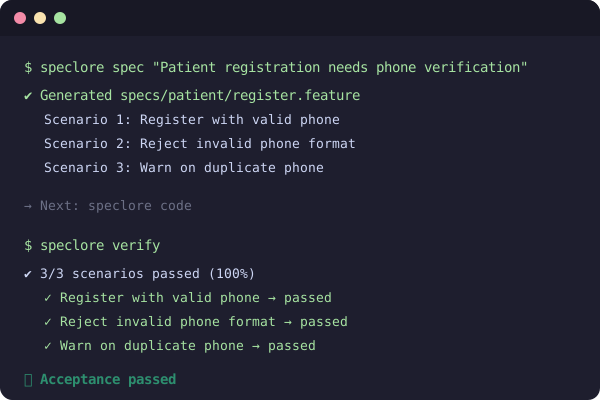
speclore spec "Patient registration requires phone verification"

# 3. Generate coding constraints + test scaffolding
speclore code

# 4. Run acceptance after coding
speclore verify
Or complete the entire workflow using natural language in your AI client — setup already configured MCP automatically.
Full tutorial
Check Getting Started for detailed tutorials on CLI, MCP + AI Client, and Hybrid approaches.
SpecLore is open source software released under the MIT License. Created by Cheney.